AI is rapidly becoming part of everyday business operations. However, most AI solutions today still operate in isolation. One system helps with data analysis, another handles communication, another connects to business applications, and other answers questions. While each system adds value individually, the real power of AI is unlocked only when these systems can work together with shared context and coordinated actions. This is exactly what MCP (Model Context Protocol) delivers.
MCP enables AI models to securely connect, understand, and act across enterprise systems like Microsoft Dynamics 365 Business Central, transforming ERP platforms from passive systems of record into intelligent, action-oriented platforms.
What is MCP (Model Context Protocol)?
MCP (Model Context Protocol) is a framework that allows AI models to communicate with business applications, tools, and data sources using a standardized, secure protocol. Instead of building one-off integrations for each AI use case, MCP acts as a universal language layer that enables:
- AI models to share context across systems
- Seamless interaction between AI and ERP platforms
- Coordinated execution of business actions
In simple terms, MCP connects AI intelligence with real business operations.
Why MCP Matters for Traditional ERP and Cloud ERP like Business Central
ERP systems including Microsoft Dynamics 365 Business Central require users to:
- Navigate multiple screens
- Apply filters manually
- Run reports
- Perform repetitive transactional tasks
With MCP-enabled AI, Business Central becomes interactive, proactive, and conversational. Instead of operating the system, users collaborate with it.
A Simple Way to Understand MCP
Think of MCP as the central nervous system of AI. Just like nerves coordinate all parts of the human body, MCP connects various AI components, so they operate as one synchronized powerhouse. The result is a single, coordinated intelligence, far more powerful than isolated AI tools.

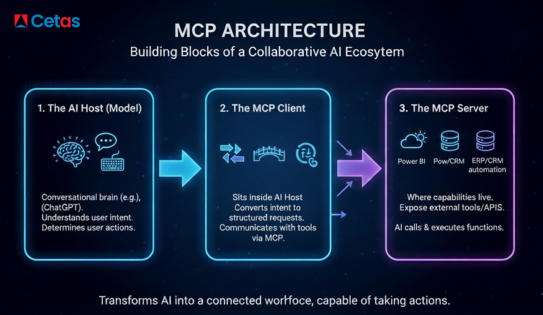
MCP Architecture: How the Model Context Protocol Enables Connected AI Systems
To understand how MCP builds a collaborative AI ecosystem, it helps to break the architecture into three core components that work together to enable intelligent, coordinated automation.
1. AI Host (Model)
The AI host is the starting point of interaction. Large Language Models such as ChatGPT, Claude, or other LLMs act as the conversational intelligence. They interpret the user’s request, understand context, and decide what action should be performed next. In simple terms, the AI Host functions as the brain of the system.
2. MCP Client
The MCP Client sits inside the AI model and works as the bridge for communication. It converts the AI’s interpreted intent into structured, standardized MCP requests. It knows how to connect and talk to other tools and services using the MCP protocol, making smooth collaboration possible. You can think of the MCP Client as a translator that ensures all systems understand each other.
3. MCP Server
The MCP Server is where real business capabilities reside. It exposes external tools, services, and enterprise data—such as CRM systems, ERP modules like Business Central, Power BI dashboards, automation APIs, or industry-specific platforms. It allows the AI model to call and execute these operations securely through standardized MCP functions.
How These Components Work Together
When combined, the AI Host, MCP Client, and MCP Server transform AI from a simple question-answering assistant into a digital workforce capable of:
- Querying ERP data
- Executing transactions
- Triggering workflows
- Generating insights
- Automating end-to-end business processes
MCP in Action: How MCP Makes Microsoft Business Central Smarter and More Powerful
So, how does MCP transform the way we work with Microsoft Dynamics 365 Business Central?
Rather than acting only as a data viewer, MCP enables AI to interact directly with Business Central in real time. This means AI can not only answer questions about your ERP data but can also perform actions, trigger workflows, and fetch precise business insights—just like a highly skilled digital assistant.
With MCP, an AI agent can seamlessly connect to Business Central ERP through defined tools and APIs, eliminating the need to manually navigate multiple pages, filters, or reports.
Real-World Example: Finance Automation
Imagine asking an AI assistant, “Show me all customers with overdue invoices above ₹50,000 and draft a payment reminder email.”
Here’s what happens behind the scenes:
- The AI Host interprets the request and understands intent.
- The MCP Client converts the task into structured MCP calls.
- The MCP Server exposes a Business Central query tool that retrieves overdue customer data.
- The AI model formats a professional reminder email for each customer—ready for review or sending.
Result: Finance teams save time, reduce errors, and act faster, without opening multiple ERP pages.
Another Example: Purchasing Automation
User asks, “Create a purchase order for 500 units of Item A to Vendor X and submit it for approval.”
Execution flow:
- The MCP Server exposes Business Central’s purchasing API
- The AI validates key data and ensures no conflicts exist
- The action is executed automatically, without manual clicks or page navigation
Outcome: A complete purchasing transaction executed through natural language.
Key Benefits of MCP for Business Central Users
MCP fundamentally changes how organisations interact with ERP systems.
Key advantages include:
- Natural language-driven ERP actions
- Reduced manual navigation and clicks
- Faster decision-making for finance and operations teams
- Secure, auditable AI execution
- Scalable automation without custom integrations
Who Should Care About MCP in Business Central?
MCP is especially relevant for:
- Business Central consultants designing intelligent ERP solutions
- ERP developers building AI-driven automation
- CFOs and finance leaders seeking faster insights
- IT leaders modernising ERP architecture
- Operations teams reducing repetitive work
From Concept to Implementation: What Comes Next?
MCP is not just a theoretical concept, it represents the next evolution of AI-powered ERP automation. By enabling AI models to collaborate directly with Microsoft Dynamics 365 Business Central, MCP:
- Makes ERP systems more intuitive
- Reduces operational friction
- Shifts focus from system usage to business outcomes
In the next blog, we’ll explore how consultants and developers can practically implement MCP—covering tools, architecture patterns, and real implementation considerations.
Stay tuned to learn how to turn MCP from a concept into a working Business Central solution.
Credit: Aksheya Suresh, Our Business Central ERP Consultant and Giridharan Ravi, Our ERP Technical Consultant Trainee.